€9.16
 PC
PC
Instant email delivery
Verified, working key
Secure card checkout
Rated 4.8/5 by gamers
PC
Action
Lara Croft and the Guardian of Light EU Steam CD Key
€2.35
Your activation code is emailed to you within seconds of purchase — no waiting, no shipping.
PlatformPC
RegionEurope
PublisherSquare Enix
DeveloperCrystal Dynamics
LanguagesEnglish, French, German, Italian +1
DeliveryInstant email
AvailabilityIn stock
SKUPH-9871
About this game
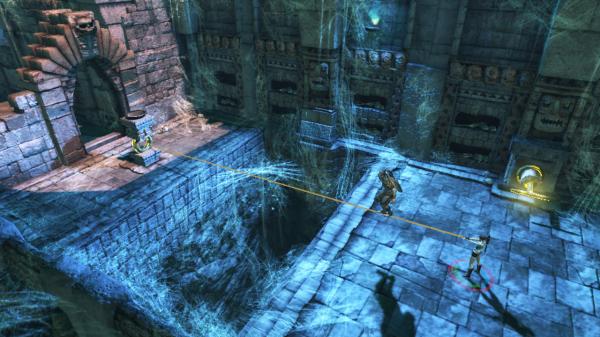
Lara Croft and the Guardian of Light is an action/adventure game featuring Lara Croft. This brand extension combines the hallmarks of the Tomb Raider franchise including exploration & discovery, platforming, and puzzle solving combined with character progression, fun fast-paced combat, and elements of human cooperation and competition. Features First downloadable only title from Crystal Dynamics, and first downloadable only Lara Croft game. A classic formula of puzzles, combat, exploration, and breathtaking visuals put through the lens of an isometric fast-paced gaming experience. A wide range of options for solving puzzles and traversing deadly environmental traps, offering players an unprecedented level of freedom to choose their own solutions and explore various paths through the dense jungles of Central America. Crystal Dynamics’ proprietary engine delivers sprawling environments with no load-times and unbelievable vertical gameplay through tombs reaching deep into the Earth. Face off against a myriad of undead warriors brought to life by the evil Xolotl, including a number of boss battles that are not to be missed!
What you get
- One activation key for PC
- Instant delivery straight to your email inbox
- The full base game, ready to download
- A step-by-step activation guide (right here)
System requirements
Windows
OS: Windows 7 / Vista / XP Processor: 3+ GHz Intel or 2.5+ GHZ AMD Memory: 1 GB RAM (XP) / 2 GB RAM (Vista) Graphics: NVIDIA GeForce 6 Series (6800GT or better) / ATI 1300XT or better Hard Drive: 7GB Sound: DirectX 9.0c compatible sound card and drivers
How to redeem
- Complete your purchase — your code is emailed to you within seconds.
- Open the official launcher or store for your platform and find "Redeem code".
- Enter the code exactly as shown in your email and confirm.
- Download, install and jump in.
Platform activation
Go to: http://store.steampowered.com/ and download STEAM client Click "Install Steam" (from the upper right corner) Install and start application, login with your Account name and Password (create one if you don't have). Please follow these instructions to activate a new retail purchase on Steam: Launch Steam and log into your Steam account. Click the Games Menu. Choose Activate a Product on Steam... Follow the onscreen instructions to complete the process. After successful code verification go to the "MY GAMES" tab…
Activation can vary by platform and region. Need a hand? Contact support.
More to play
Browse all →