
€18.14
 PC
PC
Instant email delivery
Verified, working key
Secure card checkout
Rated 4.8/5 by gamers
PC
Indie
PC Building Simulator - AORUS Workshop DLC EU Steam CD Key
€2.09
Your activation code is emailed to you within seconds of purchase — no waiting, no shipping.
PlatformPC
RegionEurope
DeveloperThe Irregular Corporation
LanguagesChinese, English, French, German +7
DeliveryInstant email
AvailabilityIn stock
SKUPH-86929
About this game
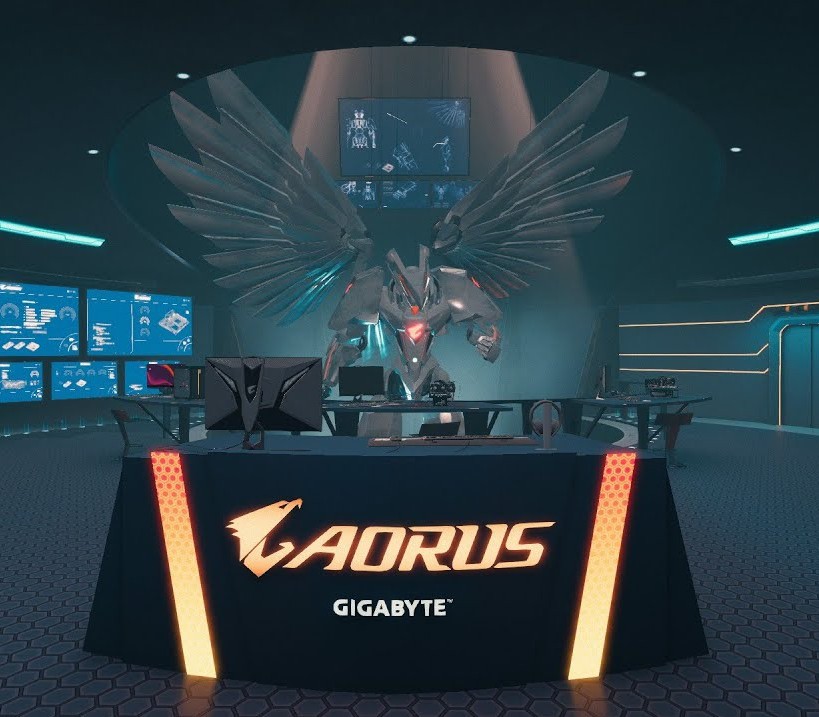
Grab your lab coat and clipboard: this is your chance to build PCs in the top secret PC and robotic development facility of the renowned AORUS gaming brand!This futuristic underground lab workshop is packed with visual flavour from the AORUS team, including a customisable version of their famous AORUS Robot.Once purchased, you can use this workshop in both Career and Free Build modes of the game, and switch between available workshops whenever you feel like a change of scenery. Features Brand new AORUS themed design and aesthetic New workshop layout Customisable AORUS Robot!
What you get
- One activation key for PC
- Instant delivery straight to your email inbox
- The full base game, ready to download
- A step-by-step activation guide (right here)
System requirements
Windows
Requires a 64-bit processor and operating system OS: Windows 7 or higher Processor: Intel Core i5-2500K or AMD Athlon X4 740 (or equivalent) Graphics: GeForce GTX 660 (2048 MB) or Radeon R9 285 (2048 MB) - Integrated GPUs may work but are not supported. Sound Card: DirectX compatible
How to redeem
- Complete your purchase — your code is emailed to you within seconds.
- Open the official launcher or store for your platform and find "Redeem code".
- Enter the code exactly as shown in your email and confirm.
- Download, install and jump in.
Platform activation
Go to: http://store.steampowered.com/ and download STEAM client Click "Install Steam" (from the upper right corner) Install and start application, login with your Account name and Password (create one if you don't have). Please follow these instructions to activate a new retail purchase on Steam: Launch Steam and log into your Steam account. Click the Games Menu. Choose Activate a Product on Steam... Follow the onscreen instructions to complete the process. After successful code verification go to the "MY GAMES" tab…
Activation can vary by platform and region. Need a hand? Contact support.
More to play
Browse all →


