
€10.46
Instant email delivery
Verified, working key
Secure card checkout
Rated 4.8/5 by gamers
Software
dlc
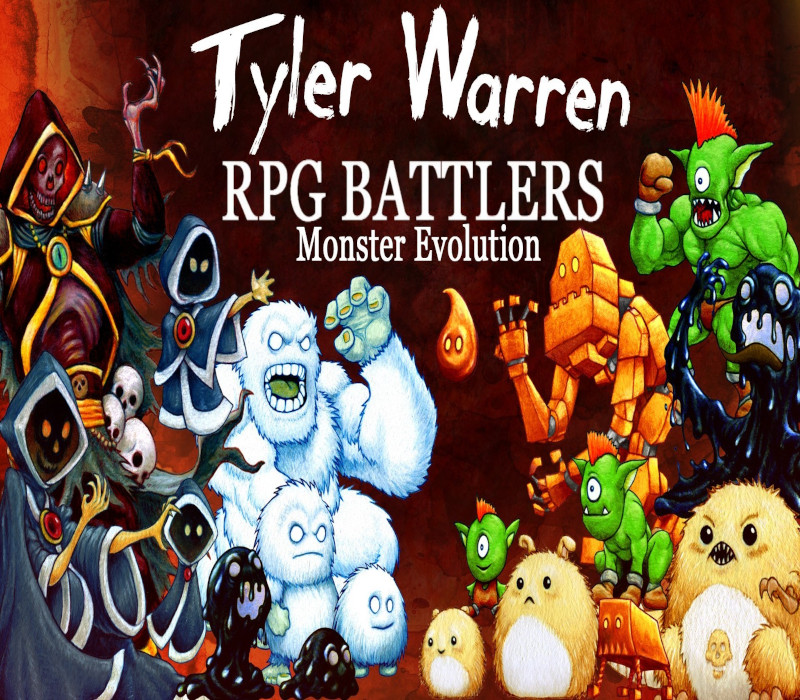
RPG Maker MV - Tyler Warren RPG Battlers: Monster Evolution DLC EU Steam CD Key
€3.21
Your activation code is emailed to you within seconds of purchase — no waiting, no shipping.
PlatformSoftware
RegionEurope
PublisherEnterbrain
DeveloperKuusou Kagaku
LanguagesEnglish, French, German, Italian +1
DeliveryInstant email
AvailabilityIn stock
SKUPH-181907
About this game
Tyler Warren brings us his 6th set of 50 monster battlers, with the theme of “monster evolution.” Each of the battlers is presented in three stages of evolution. It’s time to add a fun new dynamic to your battler lineup by starting small, evolving, and evolving again! Use them to evolve in battle, create a family of monsters (mom, dad, babies), or stronger versions of the same monster, showing their faces as your game progresses! Artwork is similar in style to Tyler’s growing library of colorful characters. Features: More than 50 unique battlers with matching face sets Files formatted for easy Plug and Play into RPG Maker MV Included is a background screen overlay that can be applied over battle backs to give them a stylized texture to match each battler Each battler is also provided in an optional “soft-filtered” version Add these to Tyler’s other battlers and fill your library with 300+ exciting characters for your next RPG Maker Project!
What you get
- One activation key for Software
- Instant delivery straight to your email inbox
- The full base game, ready to download
- A step-by-step activation guide (right here)
System requirements
Windows
Minimum: OS: Windows 7/8/8.1/10 Processor: PC with 1.0GHz Intel® Pentium® III equivalent or higher processor Memory: 256 MB RAM Graphics: DirectX 9/OpenGL 4.1 capable GPU Storage: 250 MB available space Sound Card: DirectSound-compatible sound card Additional Notes: 1024x768 or better video resolution
Linux
Minimum: OS: Ubuntu 14.04 or Steam OS 2.0 (64 bit) Additional Notes: Editor best in Desktop mode (Steam OS)
Mac
Minimum: OS: Mac OSX 10.10 or better Processor: Intel Core2 Duo or better Memory: 128 MB RAM Graphics: Compatible OpenGLR Storage: 250 MB available space Sound Card: DirectSound-compatible sound card Additional Notes: 1280x768 or better Display
How to redeem
- Complete your purchase — your code is emailed to you within seconds.
- Open the official launcher or store for your platform and find "Redeem code".
- Enter the code exactly as shown in your email and confirm.
- Download, install and jump in.
Platform activation
Go to: http://store.steampowered.com/ and download STEAM client Click "Install Steam" (from the upper right corner) Install and start application, login with your Account name and Password (create one if you don't have). Please follow these instructions to activate a new retail purchase on Steam: Launch Steam and log into your Steam account. Click the Games Menu. Choose Activate a Product on Steam... Follow the onscreen instructions to complete the process. After successful code verification go to the "LIBRARY" tab and…
Activation can vary by platform and region. Need a hand? Contact support.
More to play
Browse all →